1 前言
最近购买了 GL-inet 家的便携路由器,基于openwrt定制,可玩性非常足。
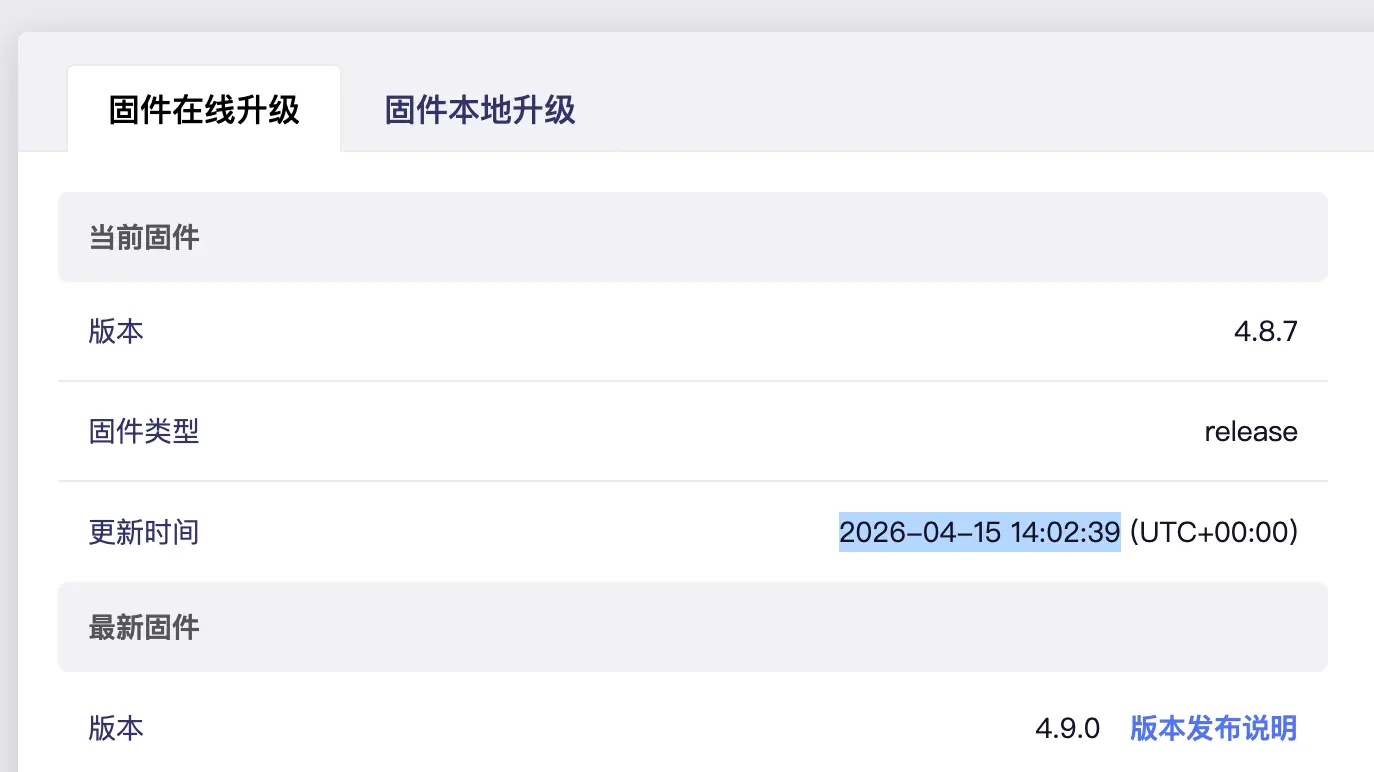
2 出厂日期
路由器出厂日期:2026-04-15 14:02:39
1
2
3
4
|
root@GL-MT3600BE:~# ls -l /proc/gl-hw-info/
-r--r--r--    1 root     root             0 Apr 15 22:01 country_code
-r--r--r--    1 root     root             0 Apr 15 22:06 device_sn
-r--r--r--    1 root     root             0 Apr 15 22:06 device_sn_bak
|
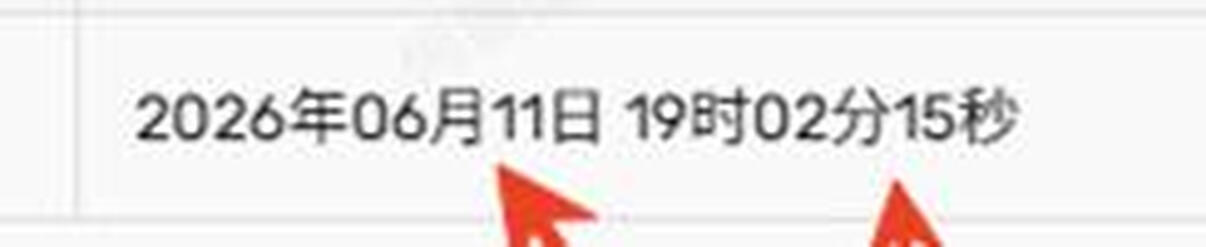
 从商家查询的出厂日期:
2026-06-11
3 修改地区US
在改区完成之后,wifi地区仍是CN,需要重置路由器。
问题1:云服务会定向到全球区。
可以尝试修改: /etc/config/glcloud, 中国区域名如下:
option server ‘gslb.gl-inet.cn’
改区之后,云服务地区是下面:
option server ‘gslb-eu.goodcloud.xyz’
3 安装 OpenClxxx
https://github.com/vernesong/OpenClash/releases
1
2
3
|
# [iptables for ipk]
opkg update
opkg install bash iptables dnsmasq-full curl ca-bundle ipset ip-full iptables-mod-tproxy iptables-mod-extra ruby ruby-yaml kmod-tun kmod-inet-diag unzip luci-compat luci luci-base
|
上传
1
|
scp -O luci-app-openclash_0.47.116_all.ipk root@192.168.8.1:/tmp/
|
4 速率测试
无线速度(内网)
电脑 ➜ 路由器(上行速度)
1
2
3
4
5
6
7
8
9
|
➜  ~ iperf3 -c 192.168.8.1 -t 10 -i 1
Connecting to host 192.168.8.1, port 5201
[  5] local 192.168.8.189 port 52071 connected to 192.168.8.1 port 5201
[ ID] Interval           Transfer     Bitrate         Retr  Cwnd
[  5]   0.00-1.01   sec  59.6 MBytes   497 Mbits/sec    0   5.00 KBytes
[  5]   1.01-2.00   sec  59.9 MBytes   504 Mbits/sec    0   5.00 KBytes
[  5]   2.00-3.00   sec  59.6 MBytes   501 Mbits/sec    0   5.00 KBytes
[  5]   3.00-4.01   sec  61.0 MBytes   509 Mbits/sec    0   5.00 KBytes
[  5]   4.01-5.01   sec  61.1 MBytes   514 Mbits/sec    0   5.00 KBytes
|
路由器 ➜ 电脑(下行速度)
 1
 2
 3
 4
 5
 6
 7
 8
 9
10
11
12
13
14
|
➜  ~ iperf3 -c 192.168.8.1 -t 5 -R
Connecting to host 192.168.8.1, port 5201
Reverse mode, remote host 192.168.8.1 is sending
[  5] local 192.168.8.189 port 53114 connected to 192.168.8.1 port 5201
[ ID] Interval.        Transfer     Bitrate
[  5]   0.00-1.01   sec  52.9 MBytes   441 Mbits/sec
[  5]   1.01-2.00   sec  91.0 MBytes   764 Mbits/sec
[  5]   2.00-3.00   sec  88.6 MBytes   746 Mbits/sec
[  5]   3.00-4.00   sec  91.6 MBytes   766 Mbits/sec
[  5]   4.00-5.01   sec  93.0 MBytes   780 Mbits/sec
- - - - - - - - - - - - - - - - - - - - - - - - -
[ ID] Interval           Transfer     Bitrate         Retr
[  5]   0.00-5.02   sec   420 MBytes   702 Mbits/sec    0      sender
[  5]   0.00-5.01   sec   417 MBytes   699 Mbits/sec           receiver
|
参考
软件源
1
2
3
4
|
➜  ~ cat /etc/opkg/distfeeds.conf
src/gz glinet_core https://fw.gl-inet.com/releases/v21.02-SNAPSHOT/mt7987a/kmod-5.4.281/aarch64_cortex-a53/kmod
src/gz glinet_gli_pub https://fw.gl-inet.com/releases/v21.02-SNAPSHOT/mt7987a/packages/aarch64_cortex-a53/glinet
src/gz glinet_gli_packages https://fw.gl-inet.com/releases/v21.02-SNAPSHOT/mt7987a/packages/aarch64_cortex-a53/packages
|
MT3600 change GeoLocation
参考: https://www.reddit.com/r/GlInet/comments/1qfeva7/guide_region_unlock_glmt3600be_beryl_7_cn_to/?show=original
Step 2: Find Your “CN” Offset
1
|
hexdump -v -e '"%_ad: " 16/1 "%02X " "\n"' /dev/mtdblock3 | grep "43 4E"
|
(Note: 43 4E is the Hex code for “CN”)

My Result: On my GL-MT3600BE, the correct offset was 16520.
Step 3: VERIFY Before Writing (Crucial)
1
2
|
# Replace 16520 with YOUR calculated number
dd if=/dev/mtdblock3 bs=1 skip=16520 count=2 2>/dev/null
|
Step 4: The Unlock Command
Once confirmed, run the write command to change “CN” to “US”.
1
2
|
# Replace 16520 with your VERIFIED number
echo -n "US" | dd of=/dev/mtdblock3 bs=1 seek=16520 count=2 conv=notrunc
|
Result: It should print exactly CN.
If it prints random junk, STOP. Recalculate your offset.
Step 5: Save and Reboot
Result
After rebooting, the router will identify as a US/Global unit.
Permanent: You can update firmware or factory reset freely; it will default to US settings.
Features: VPN (WireGuard/OpenVPN) and AdGuard Home should now be visible in the sidebar.